Home › Jurassic World Dino Trackers › T. rex Real Feel (’93 Classic)
'93 Classic Figure Guide
Tyrannosaurus rex Electronic Real Feel ('93 Classic)
This T. rex scan code belongs to the Jurassic Park ’93 Classic Electronic Real Feel Tyrannosaurus Rex (HLN19), a retro-styled 2023 Mattel figure made for the film’s 30th anniversary. It roars, it chomps, and it can swallow a Jurassic World Mini. Here is how to identify it and how to unlock it in the Jurassic World Play App.
📼 ’93 Classic🔊 Roars😋 Swallows a Mini🧬 DNA scan code
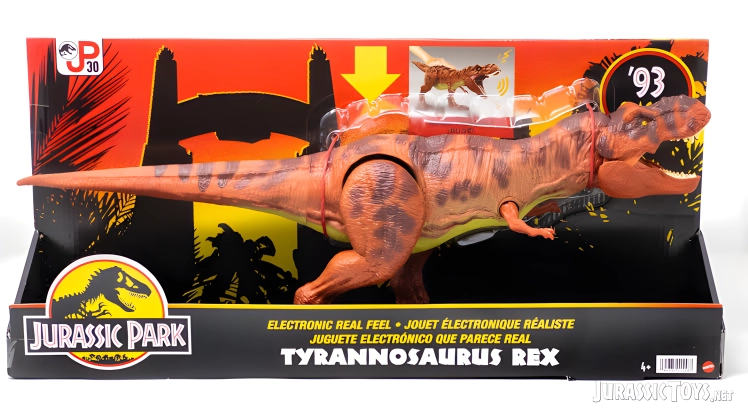
From the 1993 Toy Catalogue
The ’93 Classic line was Mattel’s nod to the toys kids found under the tree after Jurassic Park came out. So here is this T. rex as it might have appeared in a 1990s toy catalogue.
The catalogue gag is not far off: the packaging itself copies the look of the original 1993 Jurassic Park toy boxes.
What Is the '93 Classic Real Feel T. rex?
Jurassic Park ’93 Classic was a 2023 Mattel range for the film’s 30th anniversary, with boxes styled after the original 1993 Kenner toys. Collect Jurassic lists the Electronic Real Feel Tyrannosaurus Rex as a Target exclusive in the US.
It is filed with Dino Trackers on this site, but it is not part of the Dino Trackers range. The hidden tracking code unlocks the T. rex in the app.
Sculpt and Look
Colours
Official photos show a reddish brown T. rex with bold dark stripes across the back and tail and a lighter underside. The colours echo the bright, striped dinosaurs of 1990s toy aisles rather than the film animal.
Soft Real Feel body
The body, head and tail are rotocast, a hollow, slightly soft plastic that gives the Real Feel name. The mouth opens wide enough to take in a Jurassic World Mini.
Not to be confused with
Play Features
✓ Roar sounds✓ Chomp and swallow✓ Soft Real Feel✓ Tracking code
Press the hidden button on the back for roaring sounds. Open the mouth, feed it a Jurassic World Mini (sold separately), then pull the Mini back out of the stomach. Product code HLN19, for ages 4 and up.
Is It Worth Buying?
If you grew up with the 1993 toys, this one is pure nostalgia, from the box to the striped paint. As a Target exclusive it is harder to find outside the US.
What we like
- Retro 1993 styling
- Roar sound and chomp
- Fun swallow feature
Good to know
- Target exclusive in the US
- Minis sold separately
- Toy colours, not film colours
About Tyrannosaurus rex
Tyrannosaurus rex lived in western North America around 68 to 66 million years ago. Adults reached about 12 m long and weighed around 8 tonnes, with one of the strongest bites of any land animal. It was named in 1905, and the name means “tyrant lizard king”.
The Jurassic Park T. rex is probably the most famous dinosaur in film. For more rexes, see our Hunt N Chomp T. rex guide.
How to Unlock the Real Feel T. rex in the Jurassic World Play App
Open the Jurassic World Play App (it used to be called the Jurassic World Facts App), tap Scan and point your camera at the DNA code below. The same code is hidden on the figure.

Frequently Asked Questions
HLN19.
No. It is from the Jurassic Park ’93 Classic range. Its code is filed with Dino Trackers on this site.
The body, head and tail are made of a soft, hollow rotocast plastic with a textured skin.
It can chomp and swallow a Jurassic World Mini, which you can then pull back out. Minis are sold separately.
Collect Jurassic lists it as a Target exclusive in the US.
Open the Jurassic World Play App, tap Scan and point your camera at the code on the figure, or at the copy of the code on this page.